This document describes how to work with languages and translations in the Masterportal. It is intended for beginners, advanced users, and experts.
These are the objectives of the document:
This section provides background information and common knowledge on working with translations and languages in the Masterportal.
The Masterportal uses the i18next technology for translations.
For advanced users and experts, we recommend reading the short and on-point i18next documentation.
The following i18next plugins are used:
The Masterportal's main development team is seated in Hamburg, Germany. For this reason, the fallback language is currently German. You may change the fallback language within the config.js file.
A complete english translation is provided.
i18next's languages are configured in the config.js file. See the config.js documentation for details.
Language files are used to store translations by keys. These keys are used to access translations in-code and in the Masterportal configuration. To work with language files, basic JSON syntax knowledge is required.
For beginners, we recommend a quick look at these JSON guides:
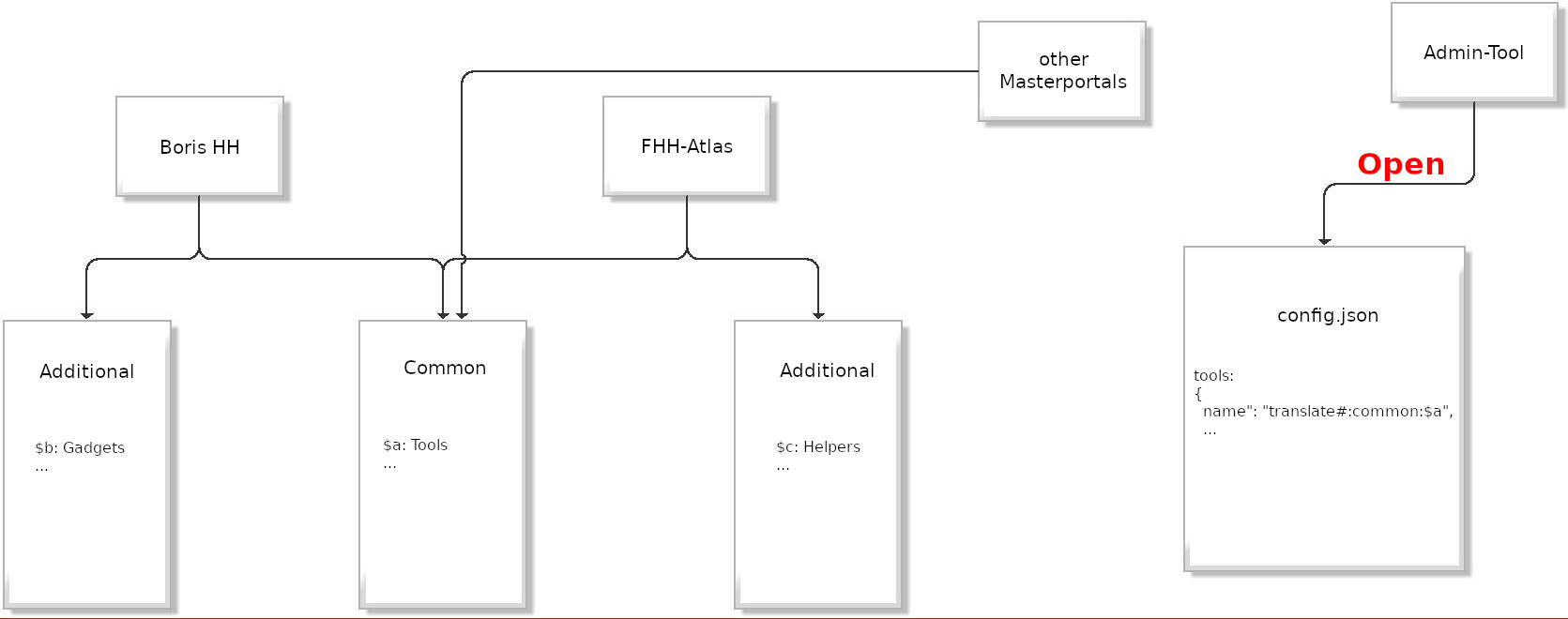
Language files are translation core. To support a language, a separate language file is needed for it. We decided to split translations into two files:
See the i18next architecture on how these files are used.
common.jsonThe common language file contains all translations used throughout the Masterportal in its standard configuration. This includes common modules as well as the most used menu entries and application logic.
additional.jsonThe additional language file is used for add-ons (formerly custom modules).
This section describes how to use i18next to translate config.json values
After a best practice scenario, the background mechanisms are explained in detail.
To translate a config.json value, the value itself must be formatted correctly. The formatted value must then be added to the translation files. If the part of the config.json is considered for translations by the Masterportal, the translation will take place. Please mind that only the field "name" is considered during translation.
Translation file common.json:
{
    "foo": {
        "bar": {
            "exampleTitle": "titulum menu",
            "exampleDescription": "aliquid",
            "exampleSubjectData": "subject data"
        }
    }
}
Translatable config.json menu part:
{
     "secondaryMenu": {
            "expanded": false,
            "sections": [
                [
                    {
                        "type": "wfsSearch",
                        "name": "common:foo.bar.exampleTitle",
                        "description": "common:foo.bar.exampleDescription",
                        "zoomLevel": 7
                        ...

}
The translation key must contain the file name. The structure of such a key is [filename]:[path.to.key], resulting in e.g. common:foo.bar.exampleMenuTitle.
The layer tree (de: "Themenbaum") can be translated as well.
⚠️ Plate note: Adding a translation key to a layer tree entry will overwrite any title or name of the service.
If the tree.type is "default" or "custom", folder names can be specified. In the following example, the tree would show the value for the key "foo.bar.exampleSubjectData" instead of "Subject data".
Default translations:
Translatable config.json layer tree part:
{
     "subjectlayer": {
            "name": "common:foo.bar.exampleSubjectData"
            "elements": [
                {
                    "name": "3D Daten",
                    "type": "folder",
                    "elements": [
                        {
                            "name": "3D-Basisdaten",
                            "type": "folder",
                            "elements": [
                                {
                                    "id": "12883",
                                    "name": "Digitales Geländemodell (DGM)",
                                    "visibility": true
                                }
                                ...
}
These possibilities and hierarchy exist:
"name": "my special subjects" is never translated"name": "common:foo.bar.exampleTitle" is translated if the key existsThe language files can be found under ./addons/{addon-name}/locales/{language}/additional.json.
A translation is implemented this way:
i18next.t("additional:modules.tools.example.title"),
Use dynamic values in your translations.
Key
{
    "key": "{{what}} is {{how}}"
}
Example
i18next.t('key', { what: 'i18next', how: 'great' });
// -> "i18next is great"
See the i18next interpolation documentation for further details.
i18next features automatic recognition of singular and plural forms.
⚠️ Note: The variable name must be
count!
Keys
{
  "key_one": "item",
  "key_other": "items",
  "keyWithCount_one": "{{count}} item",
  "keyWithCount_other": "{{count}} items"
}
Example
i18next.t('key', {count: 0}); // -> "items"
i18next.t('key', {count: 1}); // -> "item"
i18next.t('key', {count: 5}); // -> "items"
i18next.t('key', {count: 100}); // -> "items"
i18next.t('keyWithCount', {count: 0}); // -> "0 items"
i18next.t('keyWithCount', {count: 1}); // -> "1 item"
i18next.t('keyWithCount', {count: 5}); // -> "5 items"
i18next.t('keyWithCount', {count: 100}); // -> "100 items"
See the i18next singular-plural documentation for more details.
Nesting allows you to reference other keys within a translation.
Keys
{
    "nesting1": "1 $t(nesting2)",
    "nesting2": "2 $t(nesting3)",
    "nesting3": "3",
}
Example
i18next.t('nesting1'); // -> "1 2 3"
See the i18next nesting documentation for more details.
Please read the i18next formatting documentation regarding this topic.
You have set a translation key, but instead of the actual translation, the key is visible.
Please check the correct spelling of the key. i18next can't find this key neither in the selected language file nor in the fallback language file.
You have set a translation key in the config.json, but the translation does not change on language changes.
Please check first whether the module controlled by this part of the config.json has been programmed to react to translations at all.
Expert hint: The
config.jsonis translated initially when the Masterportal starts. For language changes,i18next.translatemust be used in the code. If not used, the content will permanently remain in the initially active language.
The following section is a guide on how to integrate i18next into your MP project using Vue.
The translation of the values to be displayed can be done directly in the template of a Vue component. For this purpose $t() is used. In the following example, the name attribute is translated.
ExampleTemplate
<template lang="html">
    <Tool
        :title="$t(name)"
        :icon="icon"
    >
</template>
To translate the values in the script part of a Vue component, this must be done in the computed property. For this purpose this.$t() is used.
 computed: {
    /**
    * Gets the exmaple attributes.
    * @returns {Object} The exmaple attributes.
    */
    example: function () {
        const example = {
            exampleTitle: this.$t("common:foo.bar.exampleTitle"),
            exampleText: this.$t("common:foo.bar.exampleText")
        };

        return example;
    },
 }
i18next provides a test mode for unit tests. In test mode, no real translation is performed (no files are loaded). Instead, i18next always responds with the specified key.
For unit tests in the master portal, we use "Chai". When i18next exits in a component, a mock must be created in the associated unit test.
import {config} from "@vue/test-utils";
config.global.mocks.$t = key => key;
i18next provides a test mode for unit testing. In test mode, no real translation will be provided, and no files are loaded. Instead, i18next simply responds with the given key.
For Masterportal unit testing, chai is used as an assertion library.
To set up i18next for unit testing, initialize it in the language "cimode". This sets i18next to test mode.
before(function () {
    i18next.init({
        lng: "cimode",
        debug: false
    });
});